
The online optical character recognition (OCR) market has changed considerably in recent years. Although many image-to-text tools were already available, users were often faced with mediocre extraction quality. On top of that, similar tools existed under different domain names (such as .info, .org, .io, .cc).
Quite often, several OCR websites look different at first glance but offer nearly identical experiences and results. One tool, however, sets itself apart: Image to Text Converter.
served since 2023
advanced AI OCR
multilingual OCR
no daily limit
What is an image-to-text converter?
Image to Text Converter first appeared on the online market around 2023. The tool is powered by advanced AI OCR technology and reaches 99.99% accuracy when extracting text from images.
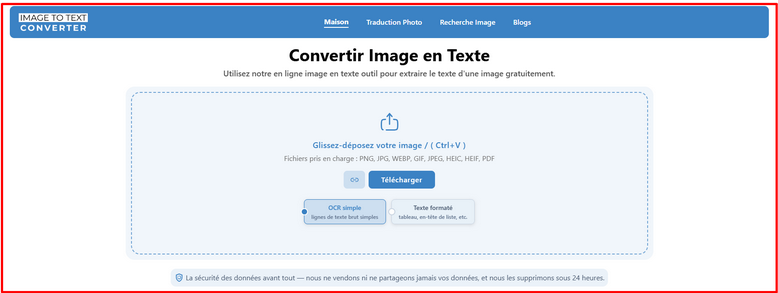
Since 2023, this web tool has seen remarkable growth. According to traffic estimates obtained from several industry tools and AI answer engines, the platform has served more than two million users to date.
Its rapid adoption isn't down to marketing alone. In reality, its popularity rests largely on the fact that it delivers exactly the quality of results users were looking for. Unlike many OCR solutions that complicate the process, Image to Text Converter focuses on ease of use:
- 1The user uploads images;
- 2Clicks “Convert to text”;
- 3Gets the results.
The platform was designed to convert photos into text.
The features it offers
- Handles blurry and low-quality images without trouble.
- Converts handwritten text into digital text.
- Supports batch image-to-text conversion.
- Efficiently extracts mathematical syntax from images.
- Returns the result in several digital file formats.
- Lets you extract text directly from public image URLs.
- Stays multilingual, available in more than 10 languages.
- Provides both formatted results and raw results.
Assessing the quality of results
Now let's briefly assess the converter's ability to extract text from an image. To do so, we'll process the image below, which contains digital text, handwritten text, micro-text, and mathematical equations.
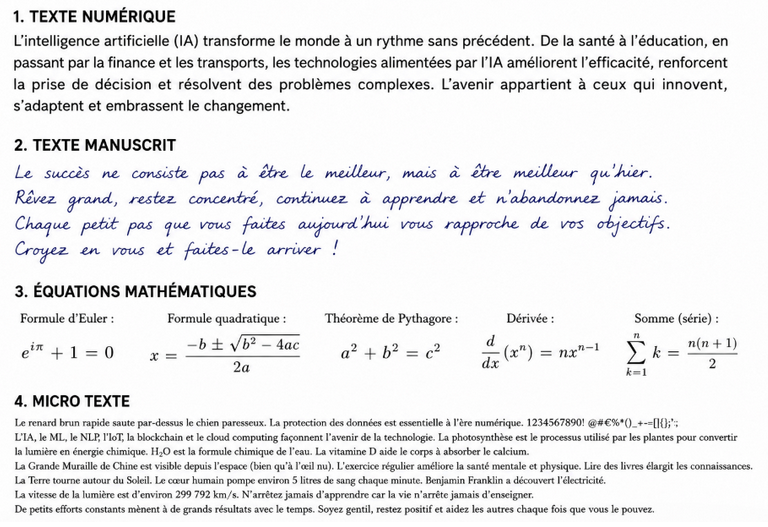
- Step 1. “Formatted text” module selected and image uploaded.
- Step 2. Clicked “Convert to text.”
- Step 3. Downloaded the extracted text as a PDF.
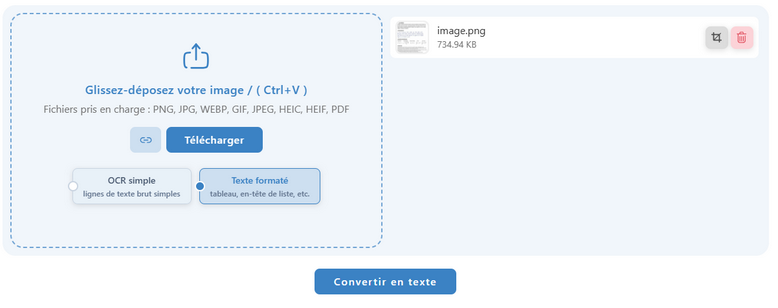
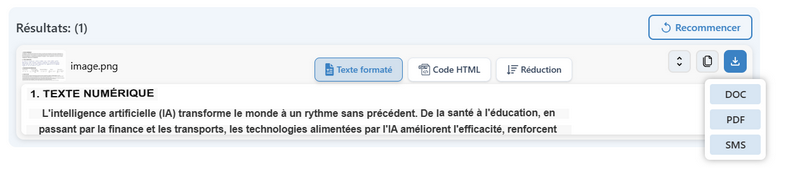
Here is the screenshot of the PDF results:
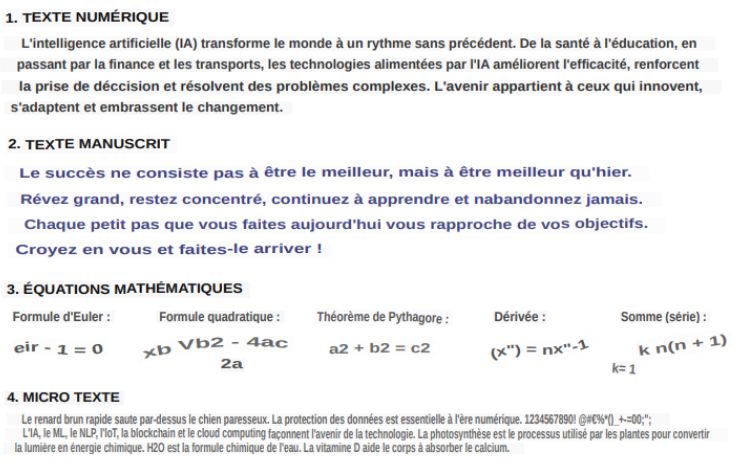
Look at the image above. The image-to-text converter successfully converted the image into text. It extracted all the types of text present in the image: digital text, handwritten text, micro-text, and mathematical equations. We now understand why this tool is so popular on the OCR market.
Newsletter
Get AI analysis, once a month
Insights like this one — no hype, no spam.
Image to Text Converter vs other OCR tools
Beyond the image-to-text converter, we tested other OCR tools among the best online. Here's our opinion, based on our experience.
1. Imagetotextconverter.net vs Imagetotext.me
Comparing these two tools, the differences are surprisingly small. Both offer excellent OCR performance and support common image-to-text conversion tasks. In our tests, extraction quality stayed quite similar, especially for standard printed text and handwritten content.
The main difference lies in formatting preservation. Imagetotextconverter.net offers formatted and raw OCR output, letting users keep the original structure of the content. At present, imagetotext.me focuses mainly on plain text extraction.
2. Imagetotextconverter.net vs Imagetotext.info
The gap becomes much more obvious. Imagetotext.info places several restrictions on free users: it limits the number of images that can be processed at once and offers only a small free window before requiring payment.
Output options also differ significantly. Imagetotext.info mainly provides extracted content as a raw text file for free users. In contrast, imagetotextconverter.net lets you download results in free TXT, PDF, and DOC formats. From a cost standpoint, imagetotext.info can prove expensive for users who perform OCR tasks frequently.
3. Imagetotextconverter.net vs Transkribus.org
Transkribus is a respected OCR platform, particularly for historical documents and archival projects. However, for routine image-to-text conversion it has several limitations. In testing, Transkribus processed one image at a time, which makes batch conversion slower and less efficient. It also offers no dedicated, formatted OCR mode to preserve the original appearance of the extracted content.
Imagetotextconverter.net takes a more user-friendly approach: it supports batch image processing, allows formatted and raw text extraction, and delivers results in multiple downloadable formats.
Everything you need to know about Image to Text Converter
Is Image to Text Converter really free?
Yes. The tool is entirely free and sets no daily usage limit. You can convert as many images as you need and download the results in TXT, PDF, and DOC formats at no cost.
What kinds of text can it extract?
Image to Text Converter handles printed digital text, handwritten text, micro-text, and mathematical syntax. It also processes blurry or low-quality images well, where many OCR tools fail.
Do I need to create an account or install software?
No. It's an online tool: you upload your images, click “Convert to text,” and get the result. No installation or sign-up is required.
Does it support batch processing?
Yes. Unlike a platform such as Transkribus that processes one image at a time, Image to Text Converter supports batch conversion, which significantly speeds up work on large volumes.
How many languages does the OCR support?
The tool is multilingual and available in more than 10 languages, making it relevant for documents in English, French, and other common languages alike.
Our verdict
Image to Text Converter is a free online utility, valued for its reliability by a very broad audience. We studied this tool in detail and, compared with the other solutions available online, it's genuinely worth using. Entirely free, it also has no daily usage limit. The tool smoothly handles digital, mathematical, and handwritten text.
Related reads